
Creator emails are the direct line for brand partnerships, affiliate deals, UGC contracts, and product seeding — faster than DMs that sit in request folders. The hard part is not writing the pitch; it is building an outreach list of published business contacts tied to creators who actually fit your product.
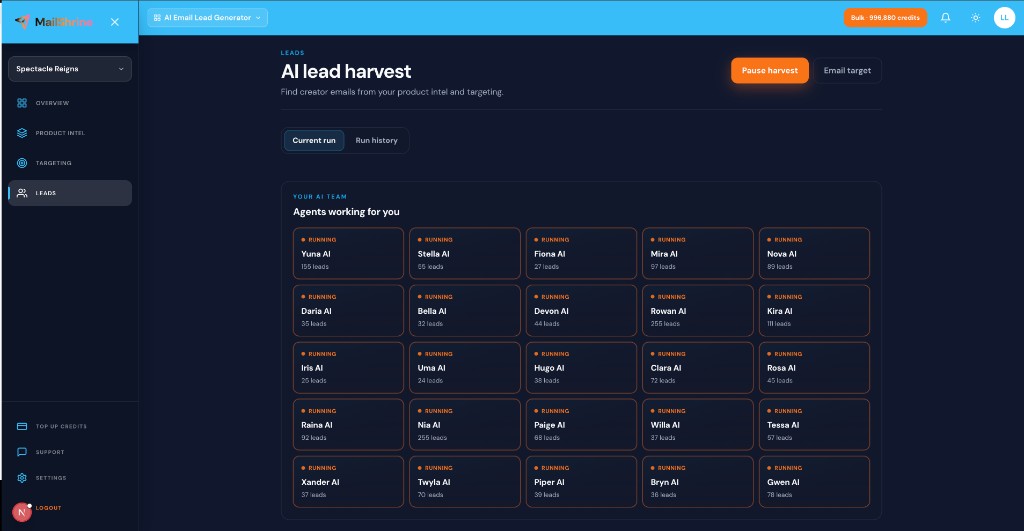
MailShrine AI Email Lead Generator helps you build that list through product-aware live prospecting: product intel defines your niche, 25 AI agents follow current signals, and email target delivery sends CSV or Excel to your inbox when your campaign list is ready. Same MailShrine login as Email Marketing for the send step.
Related: How to Find Influencer Email Addresses · Micro-Influencer Email List Building · Product Intel from URL, Text & Documents.
Real-life example: GlowPath Skincare
Maya launches a vitamin C serum for sensitive skin. She tried buying a “beauty influencer database” — 40% of addresses bounced and half the creators had pivoted to finance content. She needed micro-creators posting about redness-safe routines this month, not a 2019 dump.
GlowPath’s workflow:
- Paste
glowpath.cominto product intel and add a one-page ingredient PDF. - Audience chips: “sensitive-skin creators,” “dermatology-adjacent skincare TikTok,” “clean beauty under 50K followers.”
- Keywords: “vitamin C sensitive skin routine,” “redness-friendly skincare review.”
- Email target 200 with Excel inbox delivery.
- Score top rows with the Creator Fit Scorer before outreach.
Creator email discovery methods compared
| Method | Speed | Freshness | Fit quality | Best for |
|---|---|---|---|---|
| Live harvest (MailShrine) | Medium | High — current trails | Product-intel driven | Scaled partnership prospecting |
| Platform “business email” button | Slow manual | High when listed | You pick each creator | 5–20 hand-picked names |
| Bought influencer lists | Fast | Low — stale rows | Generic niches | Rarely worth it |
| DM-only outreach | Slow | N/A | High if they reply | Nano creators only |
| Agency databases | Fast | Varies | Expensive, broad | Enterprise brands |
Credits on MailShrine apply when an email is saved to your run (1 credit = 1 new email). Intel and keywords are unlimited within fair use.
What you need before you start
| Item | Why you need it |
|---|---|
| MailShrine account | Sign in — trial credits on first open. |
| Product intel | So agents search creator-adjacent keywords, not generic “influencer.” |
| Niche ICP | Platform, follower band, content angle. See Ideal Customer Profile for Email Leads. |
| Compliance mindset | Published business contacts only; document sources. See Public Creator Emails and Privacy Rules (when live). |
Step 1: Define creator ICP with product intel
Before hunting emails, teach the generator what you sell and who should promote it:
- Website URL — your shop or landing page.
- Text notes — commission structure, gifting policy, content requirements.
- Documents — brand deck, product one-pager, affiliate terms PDF.
- Click Analyze and edit suggested audiences.
Skintel for creator runs looks like: role + niche + platform + follower band, not “all influencers.”
Step 2: Add platform-specific audience chips and keywords
| Platform | Good audience chip | Good keyword |
|---|---|---|
| YouTube | “Skincare reviewers 10K–100K subs” | “sensitive skin routine honest review” |
| “Clean beauty creators posting Reels weekly” | “fragrance-free skincare GRWM” | |
| TikTok | “Dermatology-adjacent creators under 75K” | “barrier repair serum TikTok” |
Bulk-paste chips from your last successful partnerships. Avoid brand-name-only keywords — they find fans, not partnership prospects.
Platform guides: YouTube Business Inquiry Emails · Instagram Creator Outreach · TikTok Creator Email Outreach.
Step 3: Run live harvest and set email target
- Enter email target — e.g. 200 creator emails.
- Toggle “Email me the results when this target is reached.”
- Choose CSV or Excel (.xlsx).
- Start harvest — 25 named agents run in parallel.
This is live harvest, not a static database pull. Compare: Live Harvest vs Static Lead Databases.
When the target hits, harvest pauses and your file arrives. Details: Email Target Delivery Explained.
Step 4: Prioritize with creator fit scoring
Not every harvested row deserves a pitch first. Before sending:
- Export your list.
- Run top prospects through the Creator Fit Scorer — followers, engagement rate, niche alignment.
- Segment Tier A (high fit) for personalized templates; Tier B for lighter gifting offers.
Product intel already narrowed the pool; fit scoring orders your week.
Step 5: Export and send from the MailShrine suite
- Download CSV from dashboard or open inbox attachment.
- Sanitize before bulk send — creator inboxes still bounce stale addresses.
- Import to MailShrine Email Marketing or your sequencer.
- Use templates from Creator Outreach Email Templates That Get Replies.
Full export walkthrough: Export Leads: CSV, Excel & Email.
Maya’s creator email checklist
- Product intel loaded from
glowpath.com+ ingredient PDFCompleted - Sensitive-skin audience chips and review keywords addedCompleted
- Email target 200, Excel inbox delivery enabledCompleted
- Top 30 rows scored with Creator Fit ScorerCompleted
- Tier A outreach sent — waiting on repliesNot completed
Common mistakes to avoid
- Buying a generic influencer list — high bounce, wrong niche, compliance risk.
- Skipping product intel — agents harvest off-brand creators.
- Only searching your brand name — finds existing fans, not new partners.
- No email target — run burns credits without a clear list size.
- Pitching before fit scoring — wastes goodwill on poor-alignment creators.
Check your work
- Does product intel describe the product creators would actually promote?
- Are audience chips specific to platform + niche + size band?
- Is email target set with inbox delivery if you want hands-off export?
- Did you plan sanitize + templates before hitting send?
Frequently asked questions
Where do creator emails usually come from?
Public sources: YouTube “business inquiry” links, Link-in-bio pages, personal sites, podcast show notes, media kits, and creator newsletters. MailShrine agents follow live trails tied to your keywords — not scraped DMs.
Is finding creator emails legal?
Contacting publicly published business emails for legitimate partnership offers is standard B2B-style outreach in many markets — still follow CAN-SPAM, GDPR, and platform rules. Never buy lists of private addresses.
How many creator emails should I harvest for a launch?
Start with 150–300 for a niche product launch, score down to 40–60 Tier A pitches, then expand based on reply rate. See How to Email Influencers at Scale.
Can MailShrine replace manual YouTube About-page lookups?
Use both: live harvest for breadth at email target scale; manual checks for your dream 10 creators. Guide: YouTube Business Inquiry Emails.
Next steps
- How to Find Influencer Email Addresses — broader discovery tactics.
- Micro-Influencer Email List Building — list size and tiering.
- Creator Outreach Email Templates That Get Replies — what to write after you have emails.
Citations & References
- Reference: FTC Endorsement Guides
- Reference: CAN-SPAM Act compliance basics
Written by Ben K., Creator Partnerships Strategist. Ben helps DTC brands replace stale influencer databases with product-aware live harvest lists.